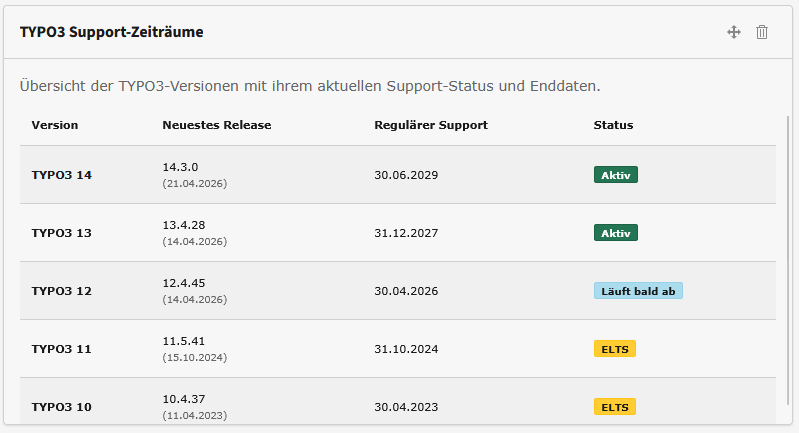
LTS steht für Long Term Support: die Version, die über mehrere Jahre gepflegt wird. Läuft dieser reguläre Support aus, bietet die TYPO3 Association mit ELTS (Extended Long Term Support) kostenpflichtige Sicherheitsupdates für einen begrenzten weiteren Zeitraum an. nt_supporttimes bildet beide Zeitachsen ab, sodass Sie sehen, in welcher Phase Ihre Version gerade steckt.
Deadline for TYPO3 Updates: Why You Should Check Your Support Periods Now
April 21, 2026 marks a turning point in the TYPO3 universe. While the community celebrates the release of the new TYPO3 v14.3 LTS, the clock is ticking for many existing installations: With the release of the new version, regular, free support for version 12.4 LTS officially ends.
From that day on, v12 will enter a phase where it will only receive critical security updates. Anyone who doesn’t have a clear overview of their support periods now risks having outdated systems and facing unplanned upgrade costs.
Transparency Instead of Guessing: The nt_supporttimes Extension
To maintain exactly this overview, we’ve developed the nt_supporttimes extension. It serves as a central dashboard for the lifecycles of your TYPO3 installations. Instead of manually looking up information in spreadsheets, the extension visualizes directly within the system how much longer your version will remain secure.
Why this is so important right now:
- The end of v12 maintenance: Since the core developers’ focus will shift to v14 starting tomorrow, maintenance for v12 will be scaled back. nt_supporttimes displays this transition graphically and unambiguously.
- Budget planning for v14: Upgrades shouldn’t be an emergency. The extension helps agencies and business owners plan the transition to the brand-new v14.3 LTS in a timely and strategic manner.
- LTS & ELTS at a Glance: Whether it’s regular maintenance or the paid Extended Support (ELTS)—the extension displays the official timelines from the TYPO3 Association.
Installation & Documentation: How to Get Started
The nt_supporttimes extension is developed according to modern standards and integrates seamlessly into professional workflows.
Easy installation via Composer
To use the extension in your TYPO3 instance, we recommend the standard method via Composer. To do so, simply run the following command in your project directory:
composer require netthinks/nt-supporttimes
After installation, all you need to do is include the static TypoScript template in the backend to activate the features.
Official Sources and Community
Transparency is important to us, which is why the extension is available both in the official TYPO3 Extension Repository and on GitHub for active collaboration:
- TYPO3 Extension Repository (TER): Find all versions and details directly in the TER under nt_supporttimes.
- GitHub Repository: The source code, along with technical documentation on configuration and Fluid examples, can be found on GitHub: netthinks/nt_supporttimes. There, you can also report bugs or submit feature requests as "issues."
With the detailed README.md on GitHub, you can set up the support timelines in just a few minutes.
The Features of nt_supporttimes
This extension is an indispensable tool for the professional management of TYPO3 sites:
- Status visualization: A quick glance is all it takes to see whether a site is in the "Full Maintenance," "Security Only," or "EOL" (End of Life) phase.
- Up-to-date: The data is based on official support periods and is regularly updated.
- Seamless integration: Easily installed via Composer, the tool integrates perfectly into the administration interface.
Conclusion: Act Instead of Reacting
The release of TYPO3 14.3 LTS is a cause for celebration, but also a wake-up call. Secure your projects by making support lifetimes transparent. With nt_supporttimes, you can turn technical deadlines into predictable roadmaps.
Is your system ready for the upgrade?
Take advantage of today to check your support periods and pave the way for TYPO3 v14!
Häufige Fragen zu TYPO3-Supportzeiten
-
Was bedeuten LTS und ELTS?
-
Woher stammen die angezeigten Daten?
Aus der offiziellen Release-Schnittstelle von get.typo3.org. Die Extension fragt sie nicht bei jedem Seitenaufruf neu ab, sondern speichert die Antwort zwischen — die Anzeige bleibt dadurch schnell und die Schnittstelle unbelastet.
-
Was passiert, wenn ich nach dem Supportende nicht aktualisiere?
Für die Version erscheinen keine Sicherheitsupdates mehr. Neu bekannt werdende Lücken bleiben dann offen, auch wenn die Website äußerlich weiterhin funktioniert. Genau deshalb lohnt es sich, das Supportende früh zu kennen: Ein geplantes Upgrade ist deutlich günstiger als eines unter Zeitdruck.
-
Wo lässt sich die Anzeige einsetzen?
An zwei Stellen: als Widget im Backend-Dashboard, damit die Redaktion die Laufzeiten im Blick hat, und als Inhaltselement im Frontend — so wie in diesem Artikel weiter oben. Welche Versionen erscheinen und ob ELTS mit dargestellt wird, legen Sie in den Extension-Einstellungen fest.
-
Was kostet nt_supporttimes?
Nichts. Die Extension ist quelloffen und im TYPO3 Extension Repository frei verfügbar. Eine ausführliche Dokumentation gehört dazu.
Automatisch übersetzt. Ohne Gewähr für Vollständigkeit und Richtigkeit.